Pattern: Task Process
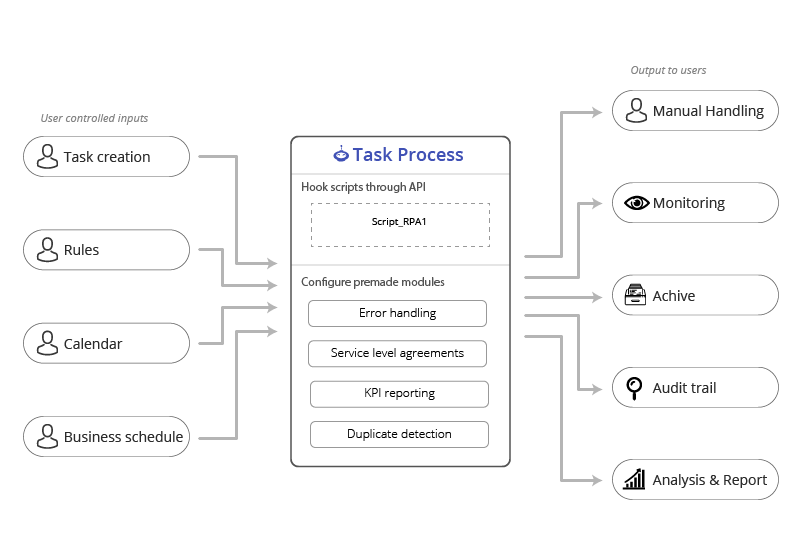
This is one of the simple designs - with only one process and with an easy-to-understand intiator: A user creates tasks.
You schedule your script to ping the queue either periodically or on agreed upon time periods - usually evenings or early mornings if the process is not critical for business.
When there are tasks to solve the process starts a run, solve the tasks, report back, and close the run again.
When to use
- When there are tasks with Keys / Input fields
- When the users decide what should be solved
- When users are used to 'Upload spreadsheets' with tasks
Run example
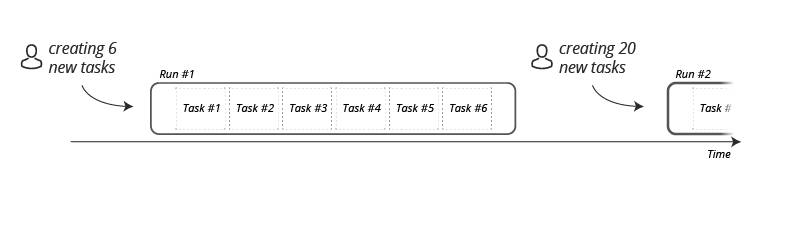 The users can create tasks whenever, and they are solved the next time you have scheduled your script to look at the process. It will work untill the ready queue is empty.
Frontend to the user
To the user this pattern will look like this.
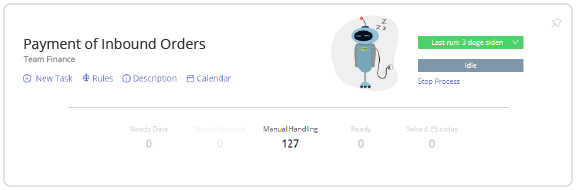
- A button for creating new tasks (single or by the thousands)
- Rules to edit the business rules of the process
- Description to keep documentation
- Calendar to decide which days should be blocked
- Queues to collaborate with the Mate on the tasks
- Needs data if they should find more info for the task
- Needs Approval if they need to approve tasks
- Ready when waiting for a Mate
- Manual handling for edge cases and error handling
- Solved when the task is completed
Behind the scenes we log data to display Analysis, Reports, Insights and KPIs, these are used in the other features of Anymate.