UiPath SDK
Anymate UiPath SDK is made for UiPath, which relies on .NET Framework 4.6.1.
Links
The SDK is available as open source and can be found on our github page.
It is available at nuget.org.
Setup
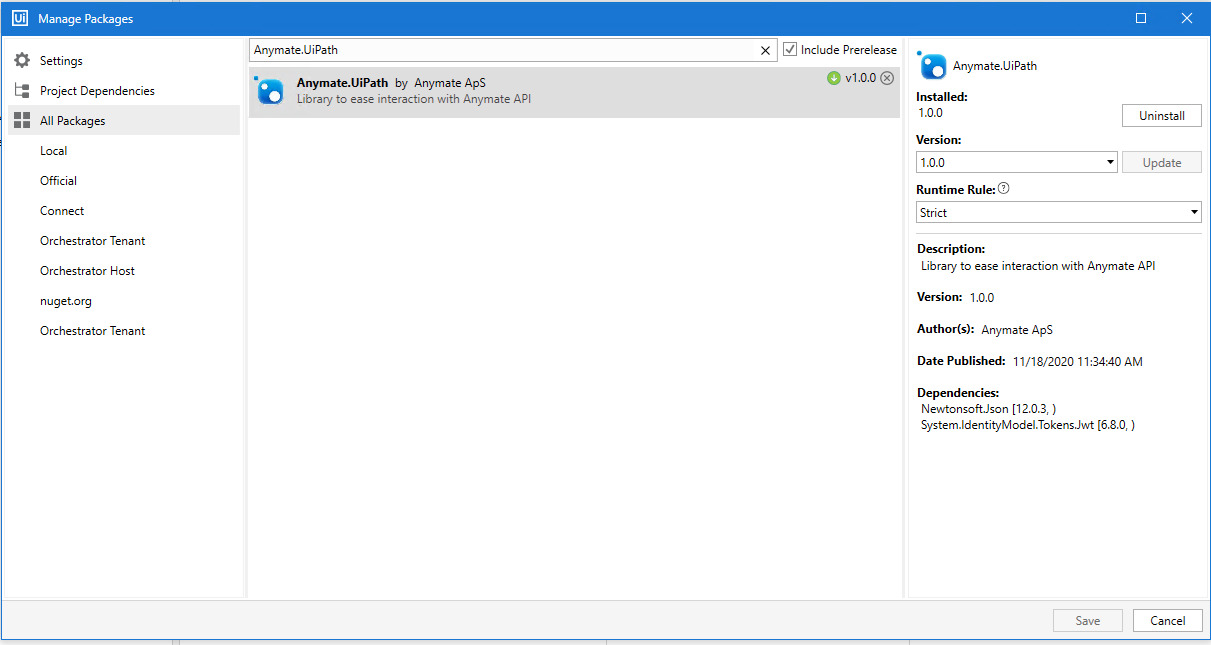
Installing the Anymate package is done in UiPath Studio from the Package Manager by searching for Anymate.UiPath.
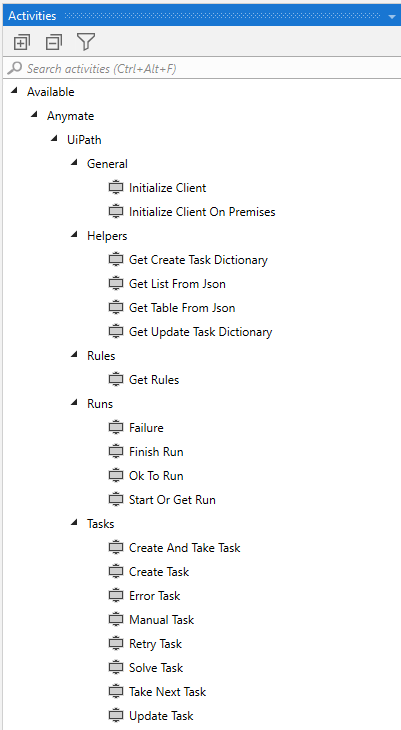
Once installed, Anymate will have a seperate entry in the Activities tab, with the different activities grouped into General, Helpers, Rules, Runs and Tasks.
Helpers are small functions to ease work
We made a few helper functions and included them in the library, as we saw a need for them while making our own robots.
In the Anymate.UiPath SDK, always make sure to call Initialize Client to get the AnymateClient object before using the other functions.
In order to make it as easy as possible to work with the Task objects that differ from Process to Process, when Anymate.UiPath returns a dynamic object (e.g. TakeNext or GetRules) then it will use Newtonsoft.Json to make a JObject.
When having to receive a dynamic object (e.g. CreateTask or UpdateTask), the SDK will take a normal Dictionary with string keys/values as input.
These choices were made to allow for using as much of the UiPath standard functionality as possible when working with Anymate, and to avoid having development becoming too complex.
The SDK is built to automatically take care of authentication with Anymate as well as refreshing access_tokens as needed. Once the AnymateClient is initialized, you don't have to worry about it.
Examples
Making a script to process Tasks is simple. In the example below, we have simplified a worker that takes Tasks, applies some business logic and always Solves the Task. In the real world, some extra steps would be added for Exception handling, Retry patterns and having some Tasks go to Manual.

In the example, we first call Initialize client to get our AnymateClient. Once we have initalized, then we check with OkToRun if there is any work to be done. If the script should run, then we do a Setup-routine before we call TakeNext to start processing Tasks. Whenever we take a Task, we check if the queue was empty and if not then we execute our business logic. Once finished with the business logic, we can call Solve Task and go back to Take Next Task.
It will often make sense to use UiPath's StateMachine functionality when setting up a script to interact with Anymate.
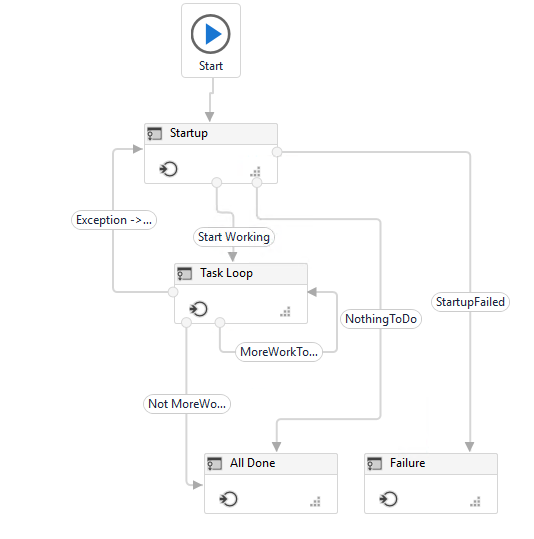
It is difficult to show in the screenshot but in the Startup state we call Initialize Client, OkToRun and GetRules.
If everything goes well, we will continue to the Task Loop. If an exception happens during startup, the state machine continues to the Failure state where we invoke the Failure activitiy
In the Task Loop, we start by calling Take Next Task and then finish it up with either Manual Task or Solve Task. The Task Loop continues until the queue is empty. If an Exception happen, Retry Task is invoked and the script till return to the Startup state where it will reset everything in order to have the best possible prerequisites for success.
Once the Task Loop has completed, the All Done state takes care of cleaning up open applications before shutting down the script.
Templates
Anymate provides Enterprise ready templates, based on the UiPath Robotic Enterprise Framework.
The templates are based on the Allocator and Worker design pattern.
Both templates can be found at nuget.org here:
Anymate.UiPath.Template.Allocator

Anymate.UiPath.Template.Worker

In order to use them, download the nuget package by selecting Download package in the right side Info menu.
Once the nuget packages are downloaded, they must either be uploaded to the UiPath Orchestrator under Libraries or put in the Local user feed which typically is at C:\Users\User\Documents\UiPath\.templates.
You can read more about how to use custom templates at docs.uipath.com.
Once installed, they can be accessed using the Templates tab when opening UiPath Studio.

Source code is available at the Anymate Github