Failure
The Failure endpoint is used for submitting when there has been a Run Failure. What we classify as a Failure is when an exception happens outside working with Task. For example, a software automation usually have a startup sequence where it will open the applications needed, instantiate some libraries or log in to external systems. If an exception happen where it can't be linked directly to a Task (as an Error), it can be classified as a Failure.
Details
When the Failure endpoint is invoked, the Process will be put in a Failure state, which will make it obvious to the users that a Failure has happened. Likewise, a Process Failure notification will be logged, which can be reviewed in Notifications for the given Process. Finally, the on-going run will be closed with an appropriate reason and KPI's will not be logged.
The Failure endpoint accept two parameters: - ProcessKey: Required - The Process where the failure has happened - Message: Required - A message describing the failure.
The Failure will automatically be removed once another action, e.g. TakeNext or StartRun, happens. We thought this was the simplest solution, as Failures that keep occuring on everyone run will be very visible but if a Failure happened due to a fringe event one time and the Mate tried again 20 minutes later with success, the Failure will just be logged but not create noise in the overview or with the organisation.
Example
The endpoint is found at https://{ClientId}.anymate.app/api/Failure/
The http-request must be submitted as a POST with JSON encoded data.
curl --request POST \
        --url https://{ClientId}.anymate.app/api/Failure/ \
        --header 'Authorization: Bearer eyJhbGciOiJSUzI1NiIsImtpZCI6IjgyQ0JGNDY3NEMyMUExRjBCMjhFNzlBNTk5MzAwQjdBIiwid.....' \
        --header 'Content-Type: application/json' \
        --data '{
                "processKey": "myProcessKey",
                "message": "a custom message describing the failure"
                }'
Using the Anymate .NET SDK, once the AnymateService is created, you send an object to the Failure endpoint in order to register the problem.
using Anymate;


// Code before omitted

//Initialize AnymateService
var anymateService = new AnymateService(client_id, client_secret, username, password);

//Start or Resume a Run using processKey as input.
var startRunResponse = anymateService.StartOrGetRun(processKey);

//Get Rules. In this example, we submit an AnymateProcessFailure object to the Failure endpoint.
var failureResponse = anymateService.Failure(new AnymateProcessFailure(){ProcessKey = processKey, Message = "Custom failure message"});

// Code after omitted
Using the Anymate Python SDK, simply invoke the failure function in anymate.client.
import anymate

# code omitted

# Initialize the client
client = anymate.client(client_id, api_secret, username, password)

# Start the run
start_run_response = client.start_or_get_run(myProcessKey)

# Register the failure using a dict as input
failure_response = client.failure({'processKey': myProcessKey, 'message': "A message describing the exception"})
failure takes a dictionary or object as input.
Using the Anymate UiPath SDK, simply invoke the Failure activity.
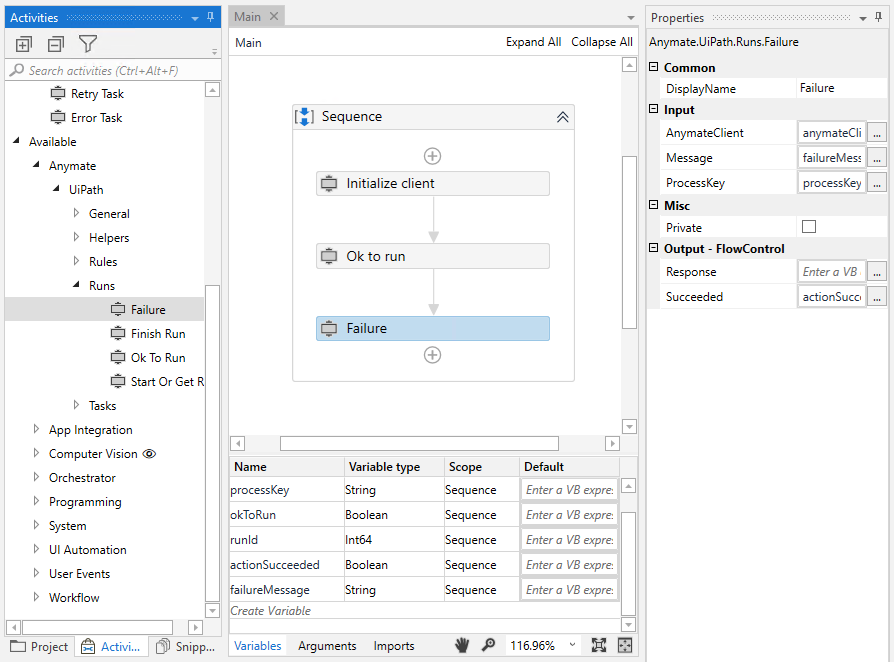
In the example, code is omitted where the variables are assigned.