Update Task
The Update Task endpoint can be used to update the fields on the Task. If for instance, you want to enrich a Task before solving it or sending it to Manual with more (structured) data then it would make sense to add some optional fields and let the Mate fill them out with Update Task.
Details
UpdataTask expects the following parameters: - TaskId: Required - TaskId is mandatory in order to know which Task should be updated. - Comment: Optional - It is possible to add a Comment at the same time as updating the task.
Remember to save the TaskId
When calling the TakeNext endpoint to get a new Task, make sure to save the TaskId so it can be used here.
All other parameters depend on the configuration of Task Data on the Process. It is not possible to update Keys, and in the case where a Mate would know a Key was wrong, we advice to create a new Task instead.
The UpdateTask endpoint will only update the attributes it is given and leave everything else, meaning if a Process has 8 fields and UpdateTask is only submitted with one of them, the remaining 7 will stay untouched.
Example
The endpoint is found at https://{ClientId}.anymate.app/api/UpdateTask/ The http-request must be submitted as a POST with JSON encoded data.
curl --request POST \
        --url https://{ClientId}.anymate.app/api/UpdateTask/ \
        --header 'Authorization: Bearer eyJhbGciOiJSUzI1NiIsImtpZCI6IjgyQ0JGNDY3NEMyMUExRjBCMjhFNzlBNTk5MzAwQjdBIiwid.....' \
        --header 'Content-Type: application/json' \
        --data '{
                "taskId": 1
                "comment": "Type in a new comment here",
                "textfield": "value",
                "numberfield": 1
                }'
Using the Anymate .NET SDK, you have to submit a object with TaskId and the attributes whose values you want updated with the UpdateTask method in IAnymateService.
using Anymate;

// code omitted

//Initialize AnymateService
var anymateService = new AnymateService(client_id, client_secret, username, password);

// Here we use an anonymous type to update the Task object.
// Make sure the attribute names are correct. Here we only want to update the 'textField' with a new value.
// It is important to include the TaskId in the object.
var updateTask = new
{
    taskId = taskId,
    comment = "Type in a new comment here",
    textField = "new text value"
};

// Update the Task.
var updateTaskResult = anymateService.UpdateTask(updateTask);
Using the Anymate Python SDK, simply invoke the failure function in anymate.client.
import anymate

# code omitted

# Initialize the client
client = anymate.client(client_id, api_secret, username, password)

# Invoke take_next, and get the task as a dict
task = client.take_next("myProcessKey")

# Read the TaskId of the new task
taskId = task['taskId']

# code omitted

# Change a value on the Task
task['textField'] = "this is the new value"

# Update the Task
update_response = client.update_task(task)

# code omitted
update_task takes a dictionary or object as input. In this example, we update the task dictionary we got from take_next but making a new dictionary with only the values we wish to change would work equally well.
updated_task = {'taskId': taskId, 'textField': "we update only this value"}
Using the Anymate UiPath SDK, simply invoke the Update Task activity.
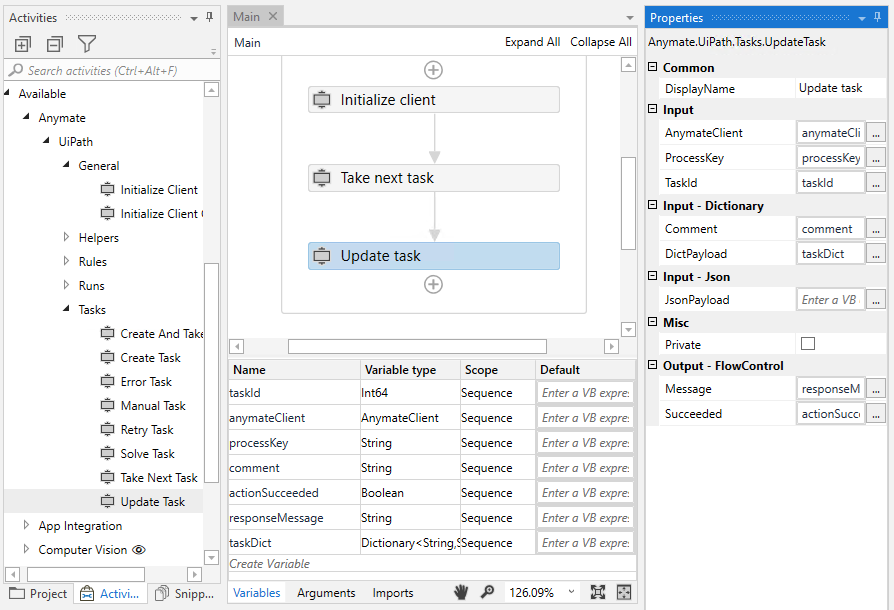
Update Task takes either a Dictionary Payload (with string key and string value) and optionally a Comment or a JSON formatted string as input, if e.g. the Developer prefers to serialize a object directly. Don't worry - Anymate ensures that anything formatted as a string, will be formatted to the correct type before you get the Task back with Take Next.
Remember TaskId when using json formatted string as input
When you use a json formatted string as input, you have to ensure to include a taskId attribute and optionally a comment attribute in the json object.