Retry
The Retry endpoint is used to send the Task back in the Ready queue. When a Task is returned to the Ready queue from the Retry endpoint, then it is placed in the bottom of the queue, and the Mate will not see it again until it has worked its way through the queue.
Details
If 'Allow for Mates to retry tasks' has not been enabled in Error Handling and a Task is sent to Retry, then it will automatically be converted to an Error. Don't worry - nothing is lost and Anymate will take care of logging what exactly has happened. In 'Allow for Mates to retry tasks' it is also required to set how many times a Task can be retried before it is converted to an Error. This is to ensure that no Task ever ends up in endless retry-loop.
Retry takes a TaskAction objet as argument
    {
        "taskId" : 0,
        "reason" : "(optional) Reason for the move",
        "comment" : "(optional) Will create a comment together with the move",
        "overwriteSecondsSaved" : null,
        "overwriteEntries" : null
    }
- TaskId: Required - Indicates which Task should be moved
- Reason: Optional - While not mandatory, it is strongly recommend to give the Task a reason to inform the users why or in what context it was moved.
- Comment: optional - Will let the Mate leave a Comment.
- overwriteSecondsSaved: optional - Overwrites the Seconds Saved settings when logging KPI's for this task
- overwriteEntries: optional - Overwrites the Entries settings when logging KPI's for this task
Use Reason as the Tasks state
As Reason is included in the object when calling TakeNext, it is possible to use Reason to keep a state on how much of the Task has been completed. For some advanced Processes, maybe solving a Task involves performing work in several systems. Maybe the Task is sent to Retry after the work has been done in the first two systems with still another third system to go. By setting a Reason that indicates this state, it is possible to code the Mate to resume directly in the third system without possible generating errors because the work has already been completed in the first two.
Use Comment to elaborate
We recommend using Comment together with the move, to elaborate on the reason and provide more information to the user as to what has happened and why the Mate did what it did. In case someone comes asking in the future, it is nice to have some data on what the Mate saw and did.
overwriteSecondsSaved and overwriteEntries is used to overwrite KPI's on the Task. It is the most common scenario that these are not included (undefined) or left as null. It typically only for advanced Mates where KPI's are followed more closely that these become relevant. If overwriteEntries is filled out, and overwriteSecondsSaved is left as null then Anymate will update the KPI's using the default settings for seconds saved pr. entry. If overwriteSecondsSaved is filled out, then that will be the value logged in the KPI's regardless of what overwriteEntries are (however amount of entries is always logged so it can still be relevant later when doing data analysis on the Mates performance). Click here to learn more about KPI's.
Example
The endpoint is found at https://{ClientId}.anymate.app/api/Retry/ The http-request must be submitted as a POST with JSON encoded data.
curl --request POST \
        --url https://{ClientId}.anymate.app/api/Retry/ \
        --header 'Authorization: Bearer eyJhbGciOiJSUzI1NiIsImtpZCI6IjgyQ0JGNDY3NEMyMUExRjBCMjhFNzlBNTk5MzAwQjdBIiwid.....' \
        --header 'Content-Type: application/json' \
        --data '{
        "taskId" : 1,
        "reason" : "(optional) Reason for the move",
        "comment" : "(optional) Will create a comment together with the move"
                }'
Using the Anymate .NET SDK, you simply call the Retry function in IAnymateService to send the Task back in the Ready queue.
using Anymate;

// code omitted

//Initialize AnymateService
var anymateService = new AnymateService(client_id, client_secret, username, password);

//Create the Task Action
var action = new AnymateTaskAction()
{
    TaskId = taskId,
    Reason = "A reason",
    Comment = "A comment to elaborate on the action"
};

//Call the Retry endpoint
var actionResponse = anymateService.Retry(action);
Use the Action model to simplify your code
By using the AnymateTaskAction model, you can create the action once and then later in the code determine if the action should go to Solved, Manual, Error or Retry.
Using the Anymate Python SDK, simply invoke the retry function in anymate.client.
import anymate

# code omitted

# Initialize the client
client = anymate.client(client_id, api_secret, username, password)

# Invoke take_next, and get the task as a dict
task = client.take_next("myProcessKey")

# Read the TaskId of the new task
taskId = task['taskId']

# Business Logic omitted

# Move the Task
action_result = client.retry({'taskId': taskId,
                            'reason': 'A Reason',
                            'comment': "Comment describing what happened"})
retry takes a dictionary or object as input.
Using the Anymate UiPath SDK, simply invoke the Retry Task activity.
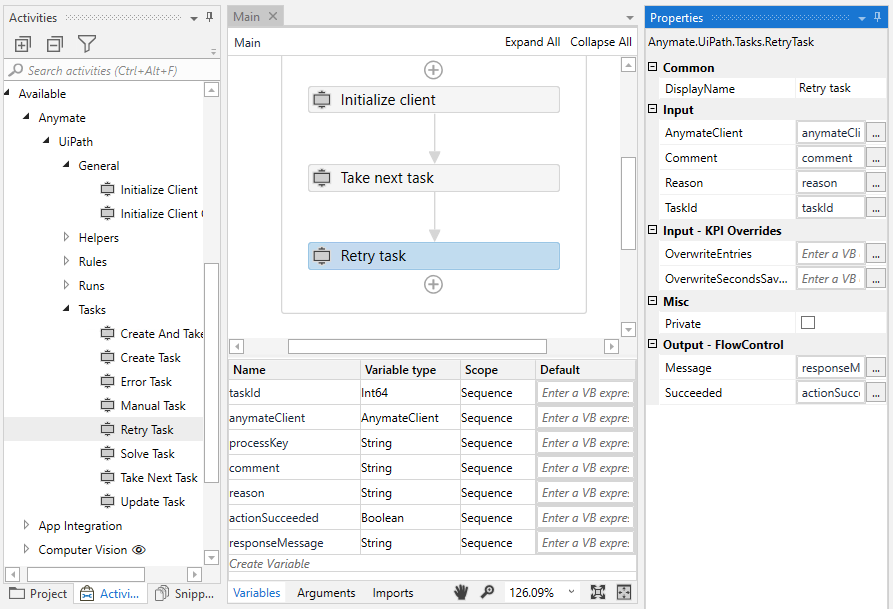
AnymateClient and TaskId (as int64) are required input. Comment and Reason are optional, however we strongly recommend using them to take full advantage of Anymate.