Get Rules
The Get Rules endpoint is used to get rules for the given Process. Rules are created in Rules, where you can also learn more about the different types of rules.
Details
In short, the Rules object is 100% customized. It will always include a ProcessKey attribute to confirm which Process the rules were fetched from. All other attributes are depending on which rules were set up.
An example could be:
        {
            "stringRule" : "appears as a string",
            "numberRule" : 5,
            "richTextRule" : "<p>also included as a string, but will have some HTML formatting</p>",
            "listRule" : ["first string", "second string", "third string"],
            "tableRule" : [{"column1": "value1", "column2": "value2"}, {"column1": "value11", "column2": "value22"}],
            "checkboxRule": true

        }
In general, the Get Rules adhere to JSON standards (as described in RFC7159). Specificially with the table rule, we found that a list of objects were the easiest way for a mate to work with a table. This way, each object will represent a row and there is no question as to which field translates to which cell in the table. See the example above.
Example
The endpoint is found at https://{ClientId}.anymate.app/api/GetRules/{ProcessKey} The http-request must be submitted as a GET with JSON encoded data.
curl --request GET \
        --url https://{ClientId}.anymate.app/api/GetRules/{ProcessKey} \
        --header 'Authorization: Bearer eyJhbGciOiJSUzI1NiIsImtpZCI6IjgyQ0JGNDY3NEMyMUExRjBCMjhFNzlBNTk5MzAwQjdBIiwid.....' \
Using the Anymate .NET SDK, once the AnymateService is created, fetching the rules is done with the GetRules or GetRulesAsync method.
When using the default overload, GetRules will return a string with all rules as raw JSON making it easy for you to deserialize it as you please.
If you provide a type argument (client.GetRules<**Type**>(processKey)) then AnymateService will deserialize the json automatically.
using Anymate;


// Code before omitted

//Initialize AnymateService
var anymateService = new AnymateService(client_id, client_secret, username, password);

//Get Rules. In this example, we have a model called 'MyRulesModel' that we give as argument to automatically have the rules deserialized as.
var rules = anymateService.GetRules<MyRulesModel>(processKey);

// Code after omitted
Using the Anymate Python SDK, simply invoke the get_rules function in anymate.client.
import anymate

# code omitted

# Initialize the client
client = anymate.client(client_id, api_secret, username, password)

# Get the rules as a dict, using a ProcessKey string as input
rules = client.get_rules("myProcessKey")

# Extract the value from 'SimpleRule'
simple_rule_value = rules['SimpleRule']
get_rules takes a ProcessKey string as input and returns a dictionary
Using the Anymate UiPath SDK, simply invoke the Get Rules activity.
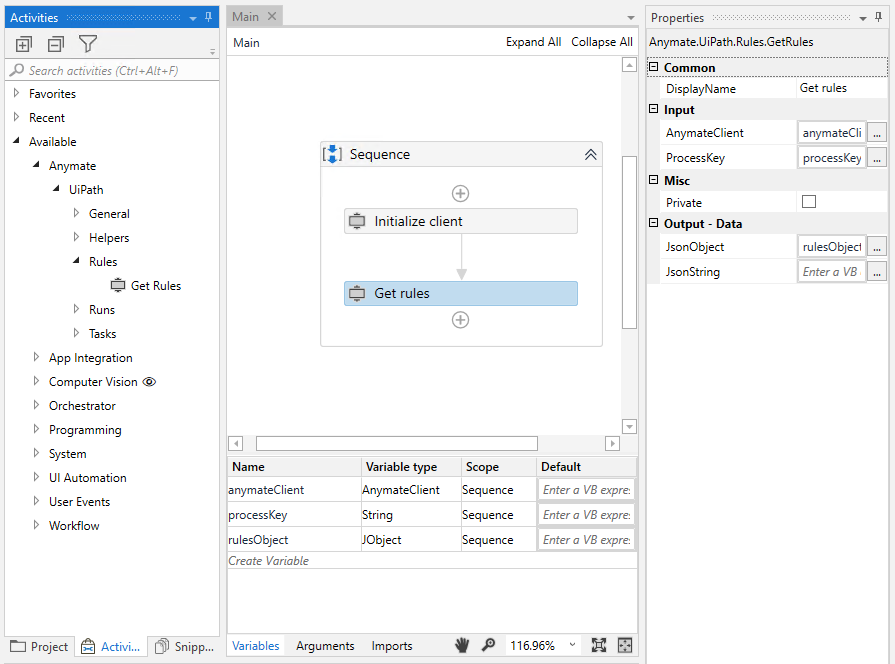
Get Rules will return a Task object in the format of a JObject, where each key/value can be invoked similar to how it would be done with a Dictionary. It is also possible to get the Task out as a JSON formatted string, from where you can serialize it directly as you please.
Keys in the Rules object are case sensitive
Please be aware that the keys used to get values out of the Rules object are case sensitive, and mirror exactly how they are entered on the Rules page.